
Give every client one place to see the work
Get Us Listed is a self-hosted client portal that puts tasks, files, messaging, support and billing in a branded workspace for each customer — while your team runs every account from one command center. Stop rebuilding status updates out of email.
Free to start · Your own server · No per-seat pricing · Full data export
If you run work for more than a handful of clients, this will feel familiar
Clients email to ask where things stand, and someone on your team rebuilds a status update by hand — again.
Files live in four different places, and the newest version is buried in an email attachment nobody can find.
Approvals happen in a reply, then get disputed a month later because there is no record of who signed off when.
Invoices sit in a separate tool, disconnected from the work, so every billing cycle starts with an argument.
You only find out a client is unhappy when they cancel — the warning signs were scattered across five apps.
Every new tool you add is one more login, one more per-seat bill, and one more place for work to hide.
One portal instead of a pile of disconnected tools
A client operations portal is the system of record for the work you do for your customers — not another internal project tool bolted onto email. Get Us Listed gives each client a private, branded workspace where the tasks, documents, messages, approvals, support requests and invoices for their account all live together, and gives your team a single command center to run every account from. Agencies, contractors, law and accounting firms, marketing and IT service providers, and any business that delivers ongoing work for multiple clients use it to replace the tangle of task boards, shared drives, chat apps, inboxes and invoicing tools that never quite talk to each other.
The difference is simple but it changes everything: because every client has one place to look, the answer to “what’s the status?” is a link, not a scramble. Because the work and the invoice live in the same workspace, billing stops being a monthly negotiation. And because it is self-hosted on your own server, the data is genuinely yours — nothing is locked inside someone else’s SaaS, and there is a full export whenever you want it. Below is everything the portal does, the pain each part removes, and exactly where the software stops today.
What your clients actually get
One login each, showing only their own workspace.
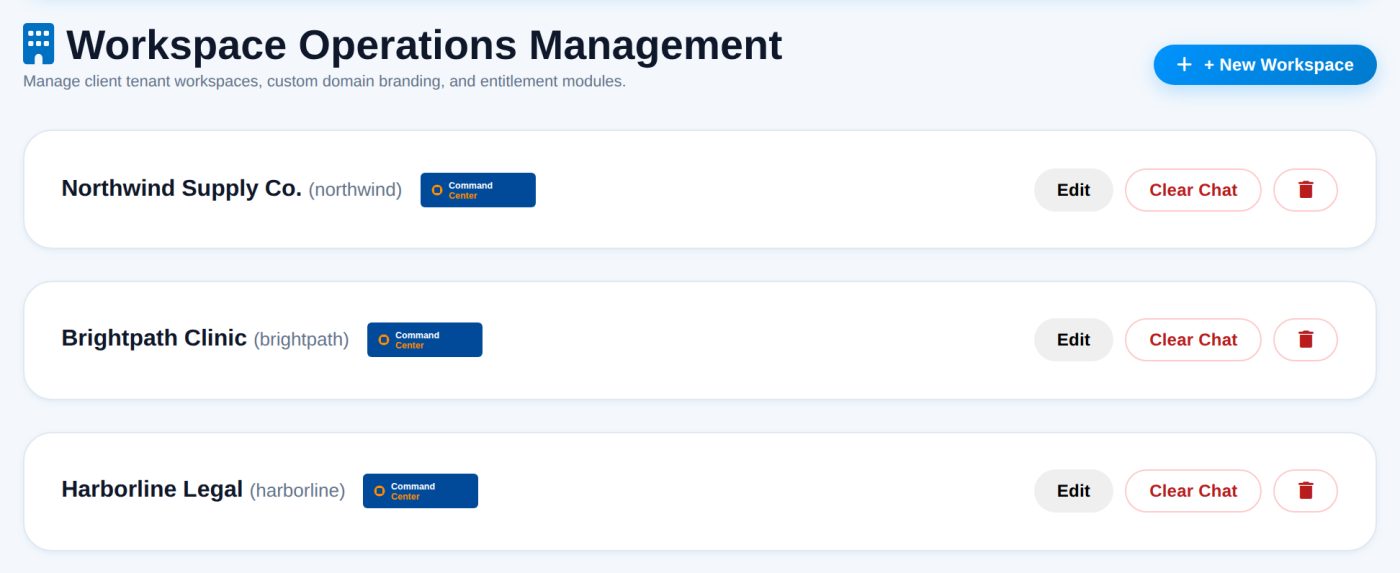
A separate, branded workspace per client
Each customer gets their own space carrying their logo and colours. They see their work and nothing else — not your other clients, not your internal messages.
- Own logo and brand colours
- Data isolated per workspace
- Invite their staff, not yours
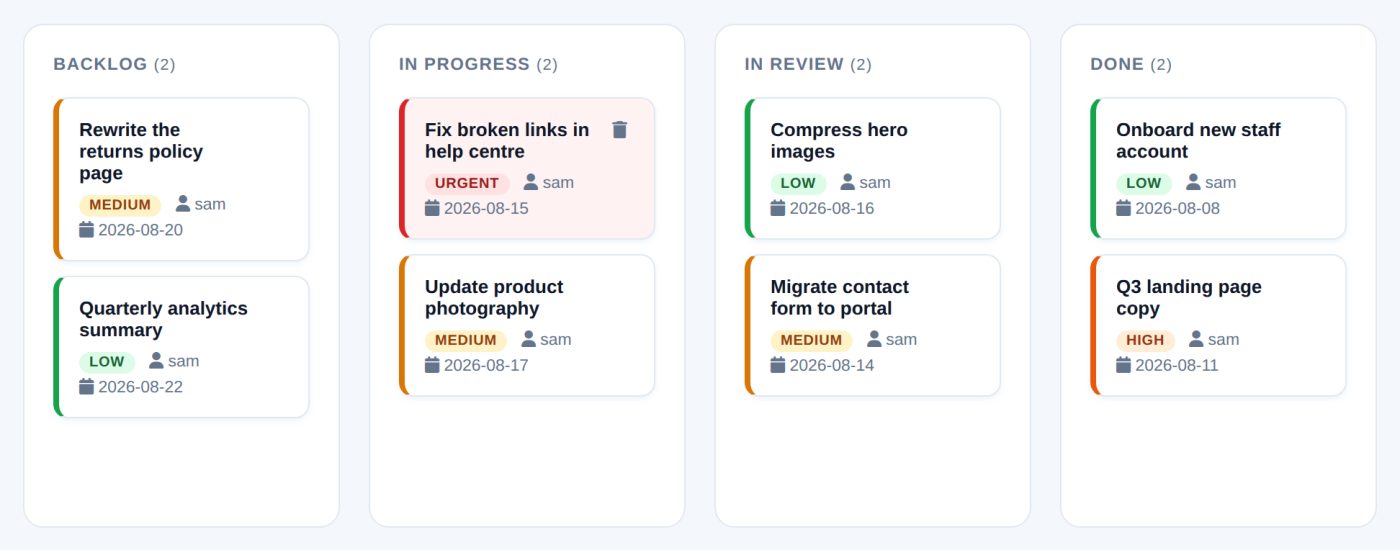
A board the client can open themselves
Shared task boards mean the answer to "any update?" is a link rather than a written recap. Drafts carry a status, so sign-off has a date attached to it.
- List and board views
- Assign to staff or the client
- Approval states with a timestamp
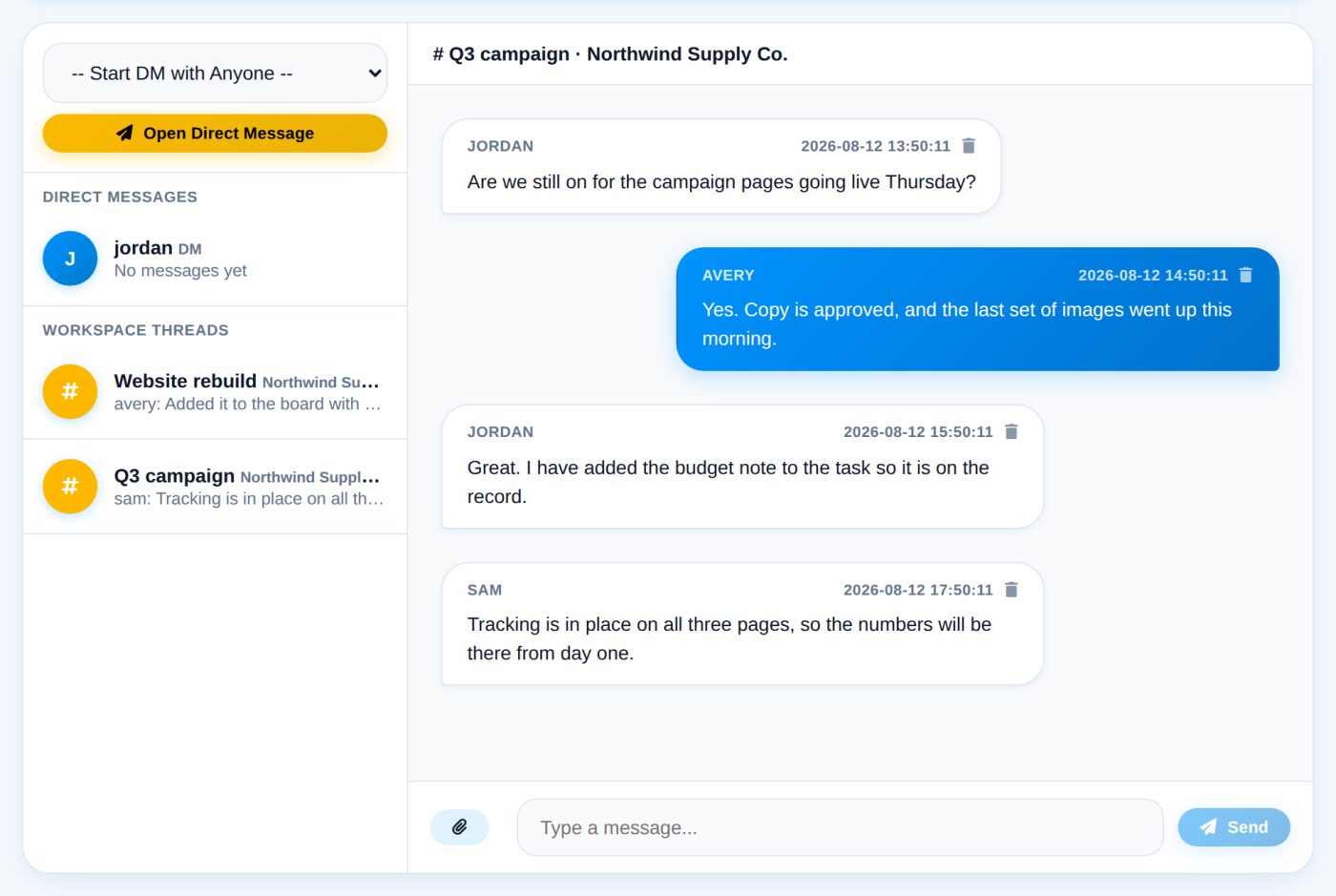
Conversations that survive someone leaving
Threads live on the workspace instead of a personal inbox. Clients raise a support request and you open a direct channel when you pick it up, so out-of-hours contact stays deliberate.
- Threads per workspace
- Direct messages for your team
- Support requests you activate
Files and money beside the work
Collect documents against the job rather than by email, and issue invoices from the same workspace so a month bills without assembling a report.
- Upload area per workspace
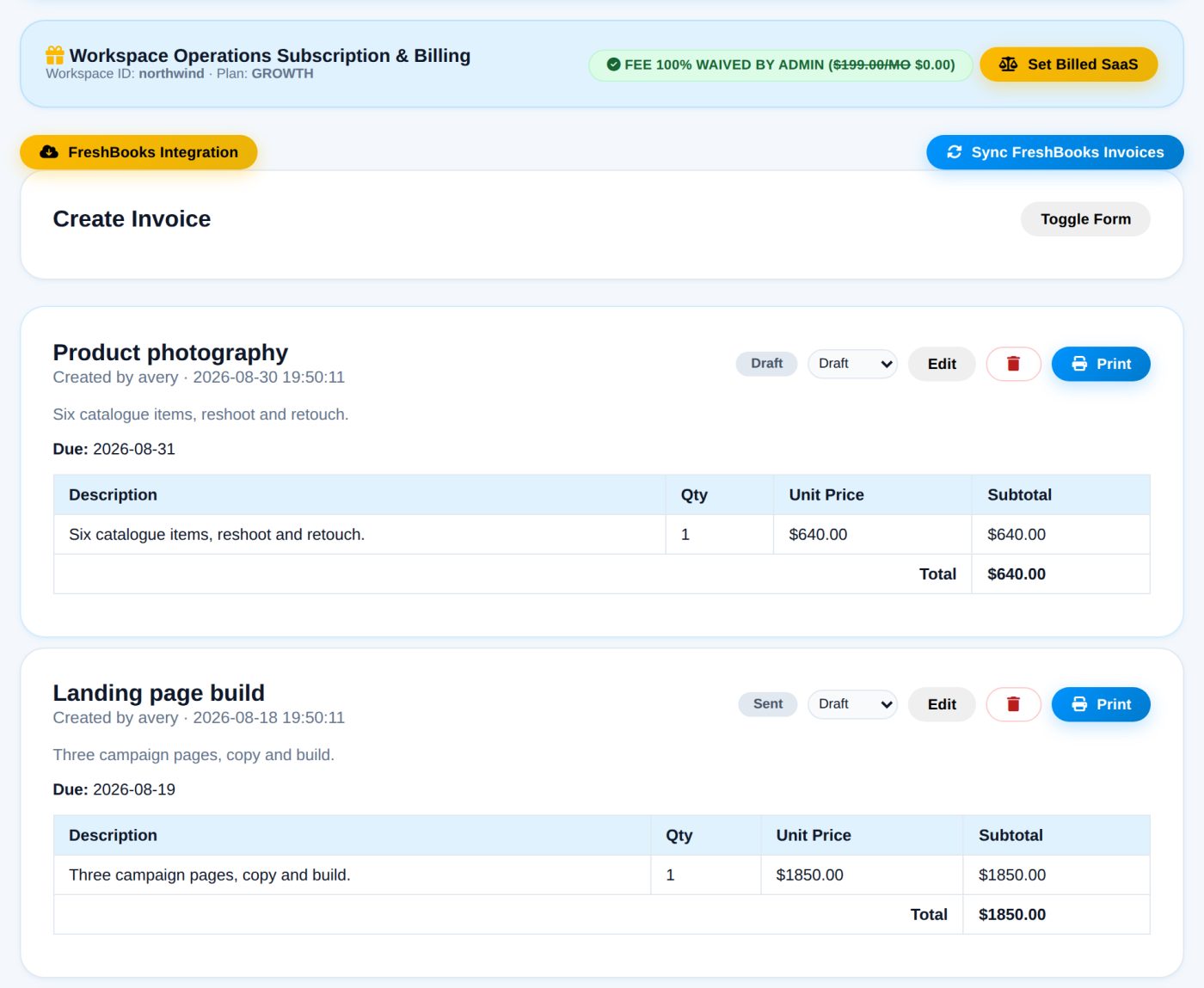
- Invoices with line items
- Draft, sent, paid or overdue
Everything your operation needs, in one system
Designed together as one product — not stitched together from separate tools that each want their own subscription.
Branded client workspaces
Give every customer a private space carrying their own logo and colours. They see their work and nothing of anyone else’s — access is isolated per workspace and enforced on the server, so one client can never see another’s data.
Client Pulse retention scores
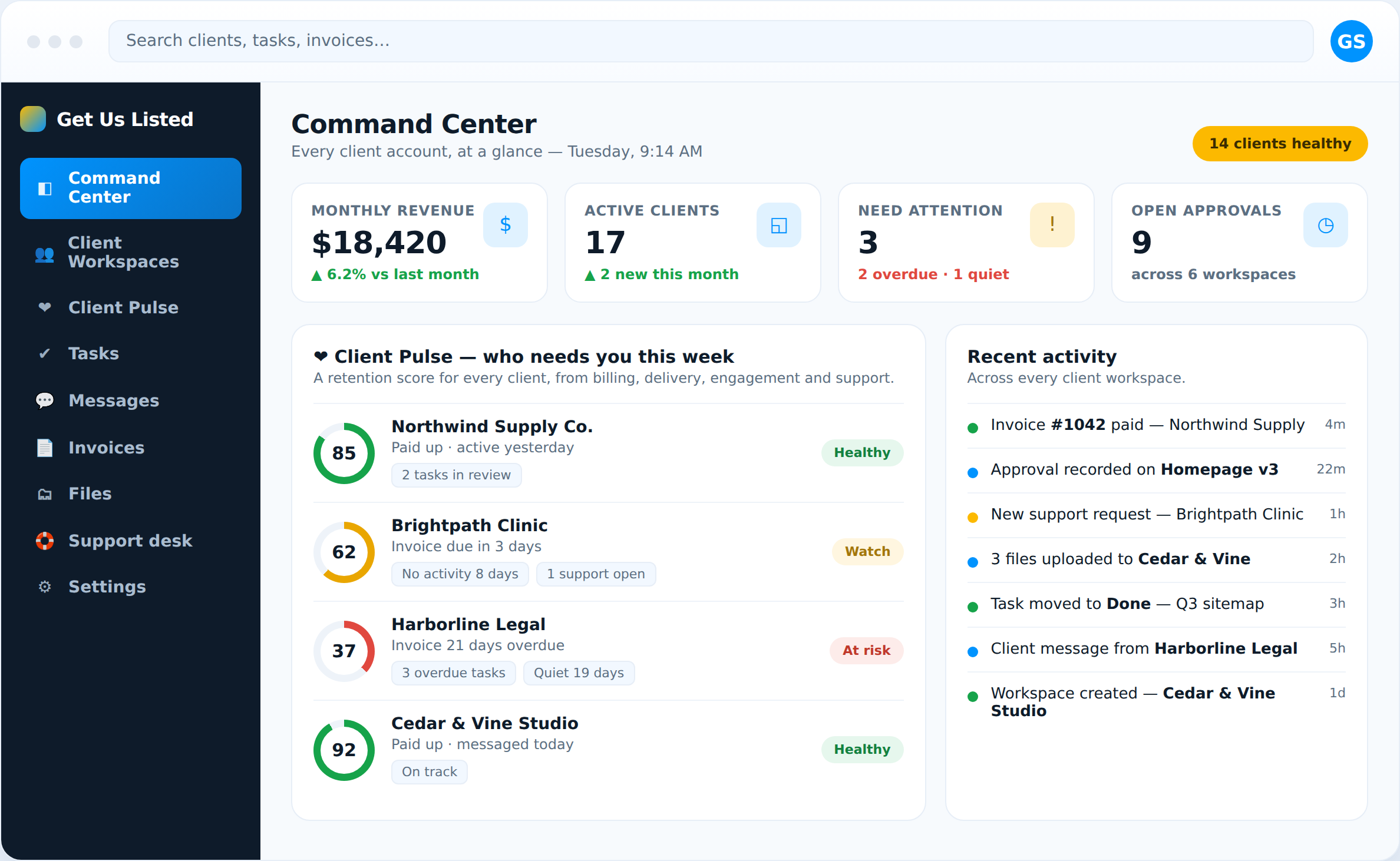
A 0–100 health score for every client, computed from billing, delivery, engagement and support. It tells you which account is quietly slipping before they cancel — so you can save the relationship while there is still time.
Tasks & Kanban boards
Shared task boards with Backlog, In Progress, In Review and Done. The client can open the board themselves, so “any update?” becomes a link, and every approval carries a timestamp instead of living in a disputed email.
Messaging & support desk
Conversations live on the workspace, not in a personal inbox, so they survive someone leaving. Clients raise a support request and you open a direct channel when you pick it up — after-hours contact stays deliberate, not chaos.
Document & file library
Collect deliverables, contracts and source files against the job instead of over email. Files are stored privately and served only to the workspace they belong to — the bytes are protected by the same tenant boundary as everything else.
Invoicing & billing
Raise invoices from the same workspace as the work, with line items and draft / sent / paid / overdue states. Recurring plans are billed through PayPal subscriptions, and the revenue shows up on your dashboard automatically.
Blog & SEO publishing
A built-in page builder and blog with real URLs, canonical tags, JSON-LD structured data and an auto-generated XML sitemap — so the marketing site and client-facing content rank, without a separate CMS to run.
Emergency ticket desk
A priority desk with loud browser alerts plus email and SMS notifications for urgent “it’s down” calls. Built for contractors, IT and facilities teams who cannot afford to miss an after-hours emergency.
Software & AI expense audit
Track every recurring software and AI subscription in one place and flag the waste. Stop paying for tools nobody cancelled — a small feature that regularly pays for the whole platform.
What your team gets: one command center for every account
Your clients get a calm, branded workspace. Your team gets the opposite view: a single command center that shows every account at once. Cross-client to-do lists so nothing falls through the cracks. A revenue figure that updates as invoices are paid. An activity feed spanning every workspace. And, above all, Client Pulse — a retention early-warning system that scores each client from the signals the portal already collects.
Most churn is not a surprise in hindsight; it is a series of small signals nobody was watching in one place. An invoice slips 20 days overdue. A workspace goes quiet for three weeks. Two tasks sit in review with no movement. A support request opens and no one has replied. Individually, each is easy to miss across five different apps. Client Pulse rolls them into one number per client and a plain-English list of why the score moved — so on a Monday morning you can see exactly which relationship needs a call, and act while it still matters. That is the difference between finding out a client is unhappy and finding out after they have gone.
Set up in an afternoon
No migration project, no onboarding call.
Create a workspace
One per client. Add their logo and pick a colour.
Invite the client
They get a login that shows only their own workspace.
Work in the open
Tasks, files and messages in one place both sides can see.
Bill from the same place
Raise invoices next to the work they paid for.
The pain points this was built to remove
“Any update?” emails that eat your week. When clients cannot see the work, they ask — constantly — and someone answers by hand-assembling a status from three tools. A shared workspace turns every one of those interruptions into a link the client can open themselves. The time you get back is not marginal; for most teams it is the single biggest win.
Version chaos and lost files. “Is this the latest?” is a question that costs real money when the answer is wrong. Collecting documents against the workspace — not scattered across email, Drive, Dropbox and WeTransfer — means there is one place the current file lives, and it is the right one.
Approvals with no paper trail. Sign-off buried in an email thread gets disputed a month later, and you eat the rework. When an approval is a recorded state with a date attached, that argument simply ends.
Billing disconnected from the work. Invoicing in a separate tool means every cycle starts by reconstructing what was actually delivered. Raising invoices from the same workspace as the work — with line items tied to real deliverables — makes the bill obvious and gets you paid faster.
Silent churn. The worst surprise in a service business is a cancellation you did not see coming. The signals were always there — late invoices, a quiet account, stalled tasks, an unanswered support request — just never in one place. Client Pulse puts them there, so an at-risk client becomes a task on Monday instead of a gap in next month’s revenue.
Tool sprawl and per-seat bills. Every disconnected app is another login, another subscription that scales with your headcount, and another place for work to hide. One system with flat per-workspace pricing removes the sprawl and the surprise invoices at the same time.
Built for how service businesses actually work
Any business that delivers ongoing work for multiple clients runs into the same operational problem, and the portal is shaped to fit each of them. Marketing and SEO agencies use it for transparent Kanban boards, editorial and content workflows, sitemap tracking and a direct line to clients. Contractors and home-service pros — plumbing, HVAC, roofing — lean on the emergency ticket desk and crew to-do lists. Law firms give clients a confidential case workspace for documents, checklists and messaging. Accountants and bookkeepers collect tax documents securely and track retainer invoices. IT and managed-service providers run sprint boards, SLA-driven incident tickets and the software-expense audit. Real estate, healthcare practices, gyms, restaurants and e-commerce brands use the same building blocks for closing checklists, facility tasks, media libraries and vendor billing.
The common thread: you look after a book of clients, the work needs to be visible to both sides, and the tools you have make that harder than it should be. If that is you, one branded workspace per client is a better shape than five apps and an inbox. There are dedicated pages for many of these industries linked in the footer, each describing the exact workflow for that field.
A new platform, and you are early
Launched in 2026 and being built with its first customers. There is no decade of accumulated compromises here, and the roadmap is still being shaped by the people using it.
Built as one system
Tasks, messaging, documents, support and invoicing were designed together rather than assembled from separate tools.
Your requests get read
Early customers talk directly to the people building it, and what they ask for is what gets built next.
Self-hosted
Runs on ordinary PHP and MySQL hosting. Your data sits on your own server and database.
Honest about its limits
Where the software does not do something, this site says so. You should know what you are adopting.
Self-hosted, and genuinely yours
Most client portals are someone else’s SaaS: your data lives on their servers, your access ends when your subscription does, and “export” means a CSV if you are lucky. Get Us Listed is the opposite. It runs on your own ordinary PHP and MySQL hosting — the same shared hosting that runs a WordPress site. Your client data sits in your database, on your server, under your control. There is a full JSON export in the admin area, and because nothing depends on our servers, nothing switches off if you stop paying or we stop building.
Isolation is enforced where it counts: every request is scoped to a workspace on the server, so a client can only ever see their own account, and uploaded files are served through an authenticated controller rather than sitting at a guessable public URL. We are also straight about the current limits — there is no encryption at rest yet, and no two-factor authentication — because you deserve to know exactly what you are adopting before you move real client data onto it. Deployment is genuinely simple: upload the files, open the installer, create your first workspace. No build step, no command line, no Node, no monthly platform fee.
Simple, transparent pricing
Start free, then flat per-workspace pricing — no per-seat surprises, no sales call, no quote to chase.
Free
Free
Up to 1 users
- Branded client workspace
- Client dashboard
- File & document library
- Blog & sitemap publishing
- Emergency ticket desk
Starter Operations Plan
$49/mo
Up to 3 users
- Branded client workspace
- Client dashboard
- Shared to-do lists
- File & document library
- Team & client messaging
- Shared inbox
- Blog & sitemap publishing
- Emergency ticket desk
Growth Agency Plan
$99/mo
Up to 10 users
- Branded client workspace
- Client dashboard
- Shared to-do lists
- File & document library
- Team & client messaging
- Shared inbox
- Blog & sitemap publishing
- Kanban task board
- + 4 more below
Enterprise Command Center
$199/mo
Unlimited users
- Branded client workspace
- Client dashboard
- Shared to-do lists
- File & document library
- Team & client messaging
- Shared inbox
- Blog & sitemap publishing
- Kanban task board
- + 4 more below
Compare every plan
Flat monthly pricing per workspace — no per-seat surprises. Here is exactly what changes as you move up.
| What you get | Free Free | Starter Operations Plan $49/mo | Growth Agency Plan $99/mo | Enterprise Command Center $199/mo |
|---|---|---|---|---|
| Users included | 1 | 3 | 10 | Unlimited |
| Branded client workspace | ||||
| Client dashboard | ||||
| Shared to-do lists | — | |||
| File & document library | ||||
| Team & client messaging | — | |||
| Shared inbox | — | |||
| Blog & sitemap publishing | ||||
| Kanban task board | — | — | ||
| Ideas board | — | — | ||
| Invoicing & billing | — | — | ||
| Emergency ticket desk | ||||
| Team management | — | — | ||
| Get Started | Subscribe | Subscribe | Contact Sales |
Optional add-ons
Bolt on only what a particular client needs. Each is priced per workspace, per month, and can be turned on or off any time.
Blog & Sitemap Suite
Publish client-facing articles and an auto-generated XML sitemap, so the work you deliver shows up in search — no separate CMS to run.
Kanban Task Board
A drag-and-drop Kanban board for work that moves through stages. Add it when simple to-do lists no longer show progress clearly.
Emergency Ticket Desk
A priority ticket desk with loud browser plus email/SMS alerts — for contractors, IT and facilities teams who field urgent “it’s down” calls after hours.
AI & SaaS Expense Audit
Track every recurring software and AI subscription in one place and flag the waste — for teams quietly bleeding money on tools nobody cancelled.
Priority Admin VIP Chat
Open a private priority channel between a client and your staff on demand — for high-touch accounts that expect a direct line.
Questions worth asking
What is a client operations portal?
It is a single system where everything you do for a client — their tasks, files, messages, approvals, support requests and invoices — lives in one branded workspace, instead of being spread across a task board, a shared drive, a chat app, an inbox and an invoicing tool. Each client gets their own private workspace; your team runs every account from one command center.
How is this different from a project management tool like Trello or Asana?
Those are internal tools built around your team. A client operations portal is built around the client: each customer gets a login that shows only their own workspace, and it includes the things a project tool leaves out — client-facing messaging, a support desk, document collection, invoicing and retention scoring. It replaces the stack, rather than adding one more app to it.
Is this ready for real client work?
It runs the day-to-day: branded workspaces, tasks, messaging, a support desk, documents, invoicing and Client Pulse. It is newly launched, so we recommend judging it on a single client before moving your whole book across. Start on the free plan and see for yourself.
What is Client Pulse?
A retention early-warning system. It scores every client from 0–100 using signals the portal already collects — overdue invoices, stalled tasks, how recently the account has been active, and open support requests — and tells you in plain English why the score moved. It surfaces the client who is quietly about to leave, while you can still do something about it.
Do you charge per user?
No. Pricing is flat per workspace, per month. Each plan includes a set number of users, and you add workspaces as you take on clients — your bill does not jump every time your team grows.
What happens to my data if you stop building it?
It is self-hosted. The application runs on your server and the database is yours, so nothing switches off if we do. There is a full JSON export in the admin area whenever you want it.
What do I need to run it?
Ordinary shared hosting with PHP 8.2 or later and MySQL — the same kind of hosting that runs a WordPress site. No build step, no command line, no Node. If you can upload files and run a web installer, you can run it.
Is my clients’ data secure?
Access is scoped per workspace and enforced on the server, so one client can never see another, and uploaded files are served through an authenticated download controller rather than a public URL. Being straight about the limits: files are not encrypted at rest and there is no two-factor authentication yet. Weigh that against what you plan to store.
Can I put my own branding on it?
Yes. Each workspace carries the client’s logo and colours, and the whole platform is white-label — your brand, your domain, your logo throughout. There is a built-in page builder for the public marketing site too.
Can I try it without paying?
Yes. Create a workspace on the free plan with no card required. Upgrade when you need more users or features.
Who is behind it?
Get Us Listed LLC, a small team that runs a marketing agency and built this for its own client work first. You can email us directly at heath@getuslisted.com — a real person replies.
Why we built it
We run a marketing agency. Every Friday somebody was rebuilding a client status report by hand out of email, a spreadsheet and a chat app, and every month an invoice went out that the client could not connect to anything they had seen.
So this is the tool we wanted: one workspace per client, everything they need in it, and nothing of anyone else’s. It is early, and we would rather tell you that than pretend otherwise. If it is missing something you need, say so — at this stage that genuinely decides what gets built next.
Reply to any email from us and it reaches a person.
Try it on one client
Start free, set up a single workspace, and see whether it removes more email than it creates.
Create your workspace